
Staying Cyber-Secure: Lessons from Social Media Scams and Email Threats
One Employee Click Can Cost Your Business: A Real Scam Story Share the Post: A while back, I nearly fell

Running a business today means learning how to manage your business technology wisely — from computers and software to phones, networks, and cloud systems. When your tech works well, your operations run smoothly. When it doesn’t, downtime and lost productivity cost you time and money.
The good news? You don’t need to be a tech expert to manage your business technology better. With the right approach, you can keep systems secure, reduce costs, and prepare your company for growth.
Here are eight proven ways to take control of your business technology and boost your performance.
 1. Keep Your Business Technology Healthy with Regular Maintenance
Think of your technology like a car: regular maintenance prevents bigger problems and keeps things running efficiently.
What you should do:
Update your software regularly. Microsoft stresses that updates are one of the best defenses against cyber threats. Turn on automatic updates when possible.
Check hardware performance. Look for overheating, slowdowns, or unusual noises — signs that replacements may be needed soon.
Keep an inventory list. Track warranties and replacement cycles so you can budget ahead.
Replace equipment before it fails. Don’t wait for a breakdown — proactive upgrades avoid downtime.
Your business technology should scale with you as you grow from 10 to 50 employees.
What you should do:
Choose software with flexible licensing (e.g., Microsoft 365 lets you add or remove seats).
Understand license reduction rules before signing contracts.
Use cloud-based services for scalability and predictable costs.
For details, see our IT Services in Huntsville page.
 3. Use Automation to Manage Your Business Technology
Automation eliminates repetitive work and reduces human error.
What you should do:
Automate backups so data is always protected.
Schedule software updates outside business hours.
Identify repetitive tasks — like duplicate data entry — and automate them.
Cybersecurity is a critical part of managing business technology. Small businesses are frequent targets due to weaker defenses.
What you should do:
Install a business-grade firewall.
Train employees to avoid phishing emails (CISA guide is a great resource).
Encrypt sensitive information.
Maintain a cyber incident response plan.
For a deeper dive, see our Cybersecurity Services.
When managing your business technology, don’t chase trends blindly.
What you should do:
Focus on solving business problems first.
Test tools before investing.
Seek advice from IT experts or peers.
IT costs can spiral if you’re not careful.
What you should do:
Review IT spending quarterly.
Prioritize investments that directly support growth and security.
Measure ROI on new tools.
Budget ahead for major expenses like servers or infrastructure.
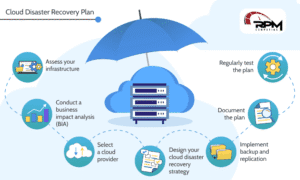 7. Prepare for Disasters Before They Happen
From cyberattacks to natural disasters, a recovery plan keeps your business running.
What you should do:
Automate offsite backups (cloud storage is affordable and reliable).
Document disaster recovery steps.
Plan for remote work if your office becomes unavailable.
Your people are the key to managing business technology effectively.
What you should do:
Provide regular technology and cybersecurity training.
Offer reliable tech support.
Encourage questions and continuous learning.
Learning how to manage your business technology doesn’t have to be overwhelming. Start small — maybe with automated backups or employee cybersecurity training — and build from there.
At RPM Computing, we help small and medium-sized businesses manage their technology with secure, budget-friendly IT solutions. Whether you need managed IT services, cybersecurity, or cloud solutions, we’re here to help.
👉 Contact us today to schedule a call and start managing your business technology better.
Staying Cyber-Secure: Lessons from Social Media Scams and Email Threats
One Employee Click Can Cost Your Business: A Real Scam Story Share the Post: A while back, I nearly fell

When IT Feels Unclear, Most Businesses Look for the Wrong Fix When something starts feeling off with IT, the typical